

Multi-factor authentication is the single most effective control most businesses can turn on. It’s also not invincible, and a recent case documented in Sophos’s 2026 Active Adversary Report shows exactly how a properly configured MFA setup can still end in a fully compromised network, over three separate waves, spread across more than a week.
How the Attack Unfolded
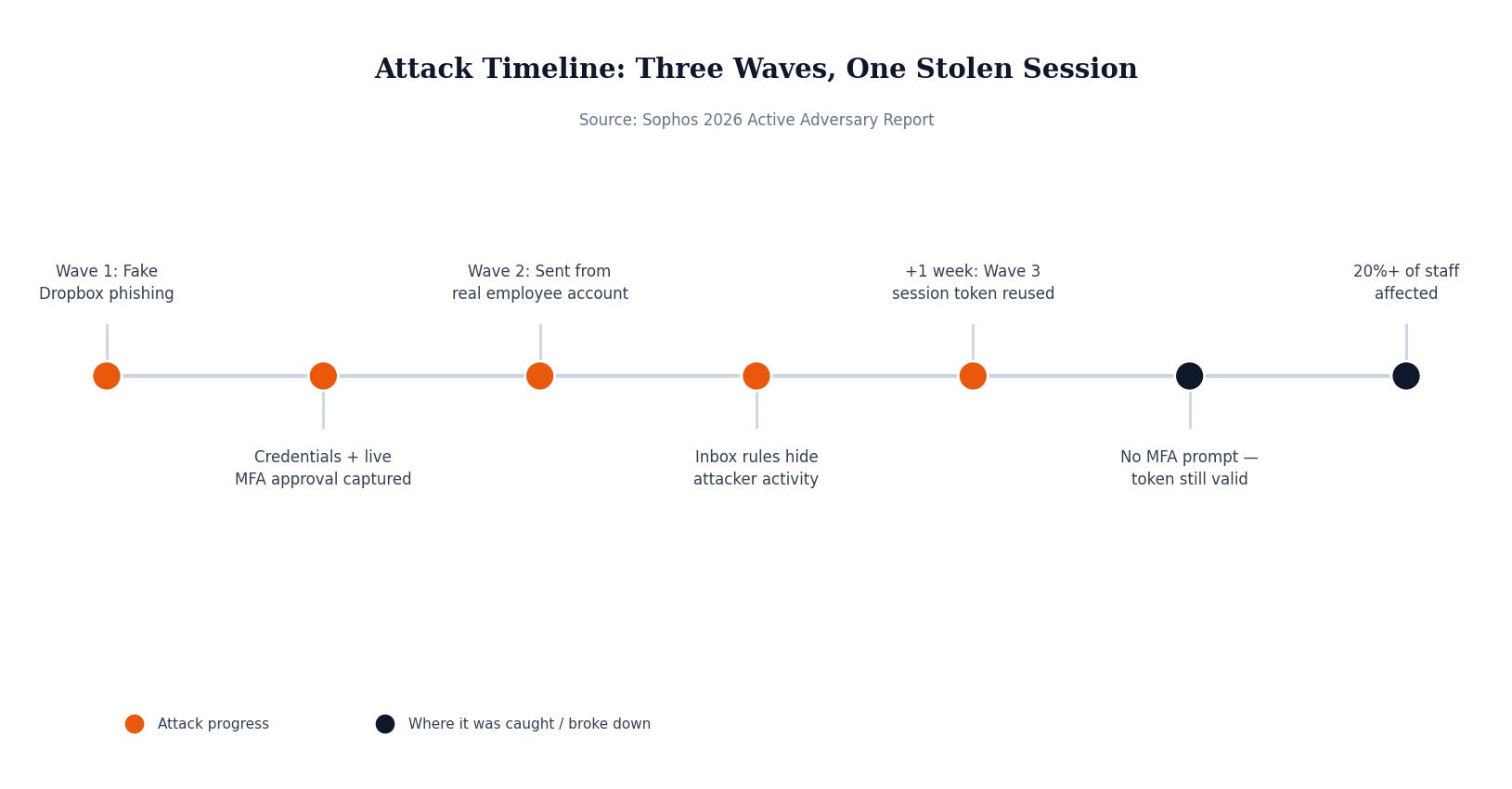
The first wave started with an email that looked like it came from Dropbox, sent from a compromised external account impersonating a trusted contact. It contained a PDF linking to a fake Dropbox login page. Employees who clicked entered their real credentials, and here’s the part worth slowing down on: seconds later, the same employees received what looked like a normal MFA prompt on their phone, and approved it. It was real. It just wasn’t theirs. The phishing kit was sitting in the middle of the login process in real time, capturing the password and immediately triggering the legitimate MFA challenge, then harvesting the session the moment the employee tapped approve.
That gave the attacker a live, authenticated session, not just a password. With that access, they built a second wave from the inside: identical malicious PDFs, this time hosted on the company’s own SharePoint and sent from a real, trusted employee’s actual email account. The phishing link even embedded each victim’s own username to make it look more legitimate. More employees fell for it, handing over more sessions. The attacker used that access to quietly set up inbox rules routing certain messages to a folder nobody checks, keeping their tracks covered.
A week later came the third wave, sent from yet another compromised account. This time, no MFA prompt appeared for the people who clicked. Not because MFA was disabled, but because the session token the attacker had stolen a week earlier was still valid. Microsoft 365’s default session lifetime runs up to 90 days, and nothing about that stolen token had been revoked. The attacker simply replayed it and walked back in.
By the time it was caught, more than one in five employees at the organization had been affected across the three waves.
Why This Matters If You’re Not a Big Company
The instinct after reading this is to think “we have MFA, we’re covered.” That instinct is exactly what this attack exploited. MFA stopped nothing here because the attacker wasn’t guessing a password from outside; they were sitting in the middle of a real login, in real time, catching everything as it happened. This class of attack, often called adversary-in-the-middle phishing, is specifically built to defeat standard MFA, and phishing kits that do it are now widely available to attackers who aren’t especially sophisticated.
The second point is just as important for a smaller business without a security team watching logins around the clock: this ran for over a week, across three separate waves, before anyone caught it. Nothing about the attack was loud. It looked, from the inside, like normal employees clicking normal-looking links from normal-looking senders.
What Actually Would Have Stopped This
Two specific gaps let this run as long as it did. First, the MFA method itself: standard app-based push approvals can be captured by real-time phishing kits because the human is still the one making the approval decision, based on incomplete information. Phishing-resistant MFA, such as hardware security keys or passkeys, is built specifically so a captured password can’t be paired with a replayed approval, because the cryptographic proof is tied to the actual website, not just to whoever’s holding the phone.
Second, the session itself needed to expire or be revoked much sooner than 90 days, and needed to be bound so it can’t be replayed from an unauthorized device even if it’s stolen. Without active monitoring watching for logins from new locations or unusual mailbox rule changes, a stolen session can sit valid and unused for a long time, waiting for the attacker to come back to it.
Security Checklist for Your Business
Move toward phishing-resistant MFA (security keys, passkeys) for anyone with access to finance, admin, or sensitive systems, rather than relying solely on app push approvals.
Shorten session token lifetimes and enable token binding so a stolen session can’t simply be replayed from a different device later.
Monitor for new inbox rules and mailbox forwarding changes. Attackers who gain mailbox access almost always set up rules to hide their tracks, and that’s a detectable, specific signal.
Watch login activity for anomalies, not just failed logins. A successful login from an unfamiliar location or device, right after a phishing email went out, is exactly the pattern this attack produced.
None of this means MFA isn’t worth having. It means MFA is a strong first control, not the whole plan, and the gap between “we have MFA” and “we’re actually protected” is usually a monitoring and configuration question rather than a yes-or-no one. MSP Today’s trusted tech partner is JK Computer Solutions. If you want a second set of eyes on your setup, get in touch.
Source: Sophos, “Nowhere, Man: The 2026 Active Adversary Report”.