

Ransomware built by a group researchers track as DeadLock represents a shift worth every business owner understanding, not because it encrypts files, all ransomware does that, but because of what it deliberately destroys before it ever touches a single document.
How the Attack Unfolded
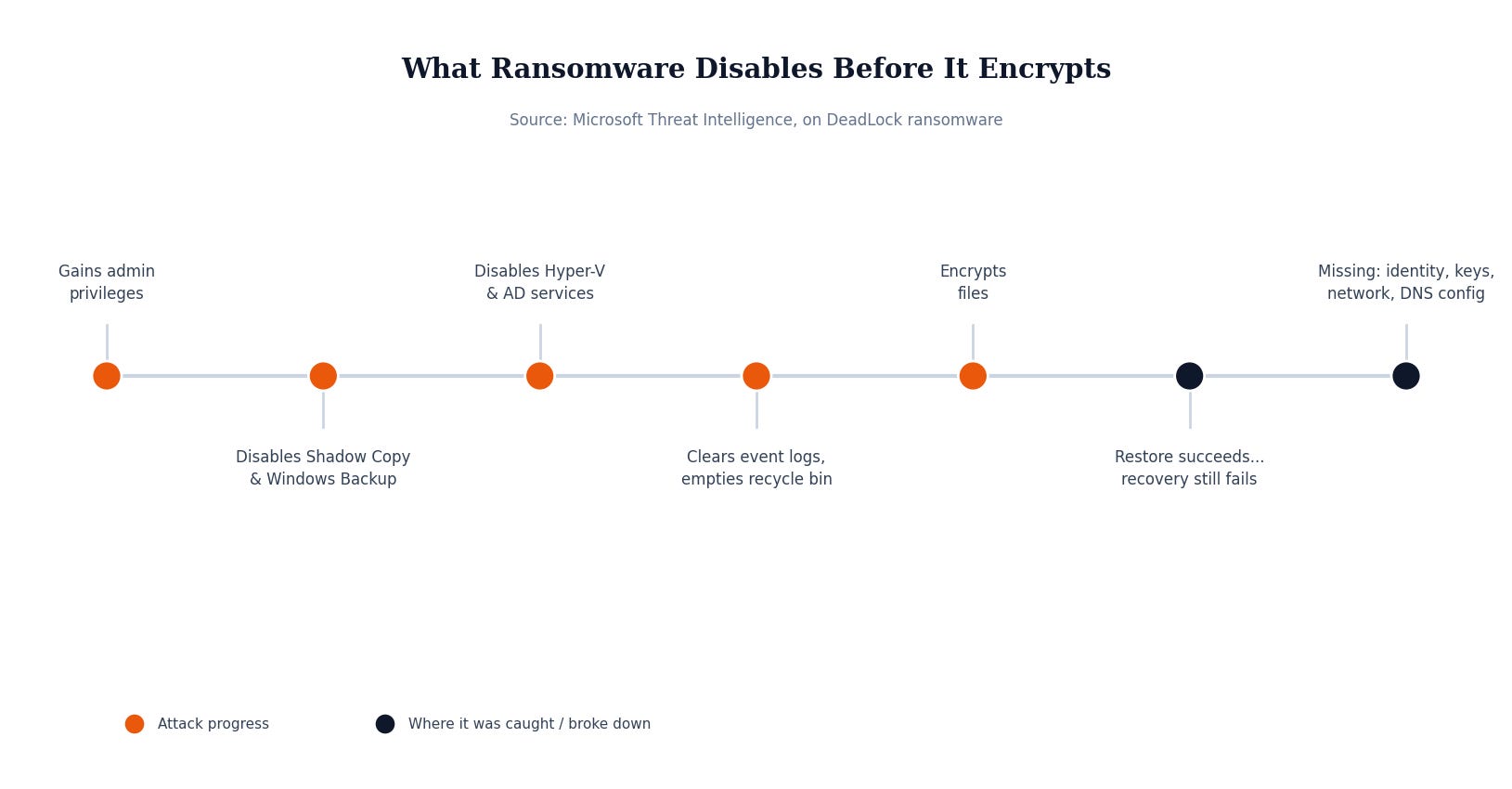
Before encryption starts, DeadLock runs a preparation phase aimed specifically at an organization’s ability to recover. Microsoft’s threat intelligence team found it systematically disables Volume Shadow Copy and Windows Backup services, the built-in Windows features many small businesses rely on as their safety net. It goes further, also targeting Hyper-V services that support virtual machines, and Active Directory services that every application and administrator depends on for authentication. Then it empties the recycle bin and clears or disables event logs, cutting off both easy recovery options and the evidence an investigator would need to reconstruct what happened.
When it runs with administrator access, and it’s specifically built to try to obtain that access, it gains the ability to touch protected files, interfere with security software, and remove the exact safety nets a business would reach for first.
The result, in the cases Microsoft studied, wasn’t simply “we lost some files.” It was organizations with backups that were technically intact, discovering that a clean copy of the data alone wasn’t enough to bring the business back.
Why This Matters If You’re Not a Big Company
Most businesses think about ransomware protection as a single question: do we have backups? This case shows that’s the wrong question, or at least an incomplete one. Researchers draw a sharp distinction between restoring and recovering: a restore returns a copy of protected data. A recovery returns a fully working business service, including the identity systems, network configuration, encryption keys, and infrastructure settings that data depends on to actually function.
That distinction shows up in painfully specific ways. A database can restore successfully while the encryption key needed to read it is gone. A server can come back online without the network routing or naming settings that let anything actually reach it. A recovery plan built months ago can be quietly out of date the moment infrastructure changes, meaning the plan and the live environment no longer match by the time you need them to.
This matters just as much for a ten-person company running everything through a few cloud services as it does for a large enterprise. The dependency chain, identity, network, keys, configuration, is just as real at small scale. It’s simply less likely anyone has ever tested whether it actually reconnects after a real failure.
What Actually Would Have Stopped This
The fix isn’t a better backup tool. It’s testing the full recovery, not just the data copy. That means confirming your recovery plan restores identity systems, encryption keys, private networking, DNS, and application configuration, not only files and databases. It means verifying your backups are genuinely immutable against a compromised administrator account, since an attacker with admin rights can otherwise delete or encrypt the backups right along with everything else. And it means actually rehearsing a full recovery on a regular schedule, because environments change faster than backup plans get reviewed, and a plan nobody has tested since it was written is a plan you’re hoping works, not one you know works.
Security Checklist for Your Business
Confirm backups cover the full dependency chain, not just data: identity, encryption keys, network configuration, and DNS all need a documented recovery path.
Verify immutability against an administrator account, not just against outside attackers. Backups an admin login can delete are backups ransomware with admin access can delete too.
Test a full recovery on a real schedule, not just a data restore. The gap between “we have backups” and “we can actually recover” only shows up when you try.
Keep a recovery point that predates the compromise, not just the newest backup available, since some ransomware sits quietly for a period before triggering encryption.
A backup you’ve never tested recovering from is a plan, not a safety net. The businesses that come back quickly from an incident like this are the ones who found the gaps in a drill, not during the actual emergency. MSP Today’s trusted tech partner is JK Computer Solutions. If you want a second set of eyes on your setup, get in touch.
Source: Microsoft Threat Intelligence, on DeadLock ransomware, as reported by Decryption Digest, “DeadLock Ransomware Recovery: Why Backups Alone Aren’t Enough”.