

The Company That Had a Recovery Plan — And Lost Anyway
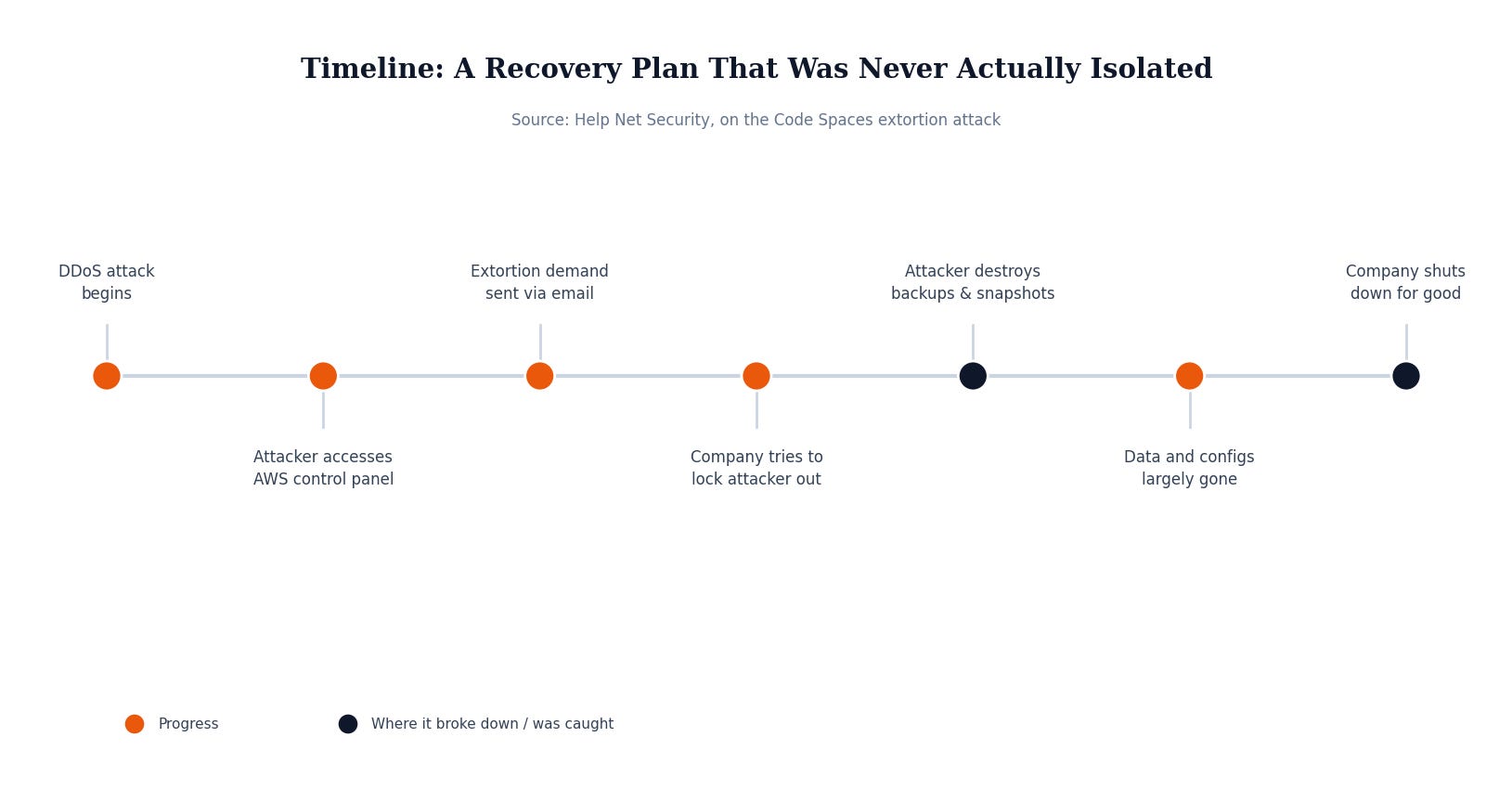
Code Spaces was a small company offering code hosting and collaboration tools for software teams, built entirely on Amazon Web Services. In June 2014, it was hit with a DDoS attack, and shortly after, an intruder gained access to the company’s AWS EC2 control panel. The attacker left extortion messages through a Hotmail account, demanding payment to hand back control.
Code Spaces tried to do the obvious thing: change the passwords and lock the attacker out. But by then the intruder had already set up backup logins of their own. When the team moved to retake the account, the attacker retaliated by systematically destroying what was there. In the company’s own words, “he had removed all EBS snapshots, S3 buckets, all AMI’s, some EBS instances and several machine instances.” Most of the company’s data, machine configurations, and offsite backups were partially or completely wiped out in the process.
The bitter irony is that Code Spaces believed it was covered. The company had publicly stated it maintained “a full recovery plan that has been proven to work,” including offsite backups. What that plan didn’t account for was that those backups, along with everything else, were reachable through the exact same AWS control panel the attacker had already compromised, with no multi-factor authentication standing in the way. Separate backups only protect you if an attacker (or a fire, or a flood) can’t reach them too.
Code Spaces never came back from it. The company’s own statement was blunt: the cost of resolving the incident would put them in “an irreversible position both financially and in terms of ongoing credibility.” They shut down entirely, spending their final days helping customers pull out what data they could before the business ceased trading for good.
Why This Matters If You’re Not a Big Company
It’s tempting to read this and think “we’re not a tech company running on AWS, this doesn’t apply to us.” But strip away the cloud-specific details and the failure is completely ordinary: one login, one control panel, one point of failure that touched both the live systems and the backups meant to save them if something went wrong. That’s not a big-company problem. It’s the default setup for most small and mid-size businesses that never had someone sit down and design their backups on purpose.
Most SMBs assume they’re covered because “we have backups” — a server that copies files somewhere, a NAS in the closet, a folder synced to the cloud. What almost never gets asked is: if the thing that destroys your main system also has access to your backup, are you actually protected? A fire that takes out the office takes out the NAS sitting in it too. A compromised admin account that can delete production data can usually delete the backup copies sitting right next to it. A plan that’s never been tested against that scenario isn’t really a plan — it’s an assumption.
What Actually Would Have Stopped This
The fix here isn’t complicated, but it does take deliberate setup. Backups need to be isolated from the systems they protect — physically, logically, or both — so that whatever destroys your production environment (a hacker, a fire, a hardware failure, a ransomware payload) can’t also reach the copy meant to bring you back. That means offsite or cloud backups with separate credentials from your day-to-day admin account, ideally with multi-factor authentication and some form of immutability or delayed deletion so a single compromised login can’t wipe out both the original and the backup in one move.
Just as important: a recovery plan is only real if it’s been tested. Code Spaces believed its plan worked because it had never been forced to prove otherwise under attack. A backup you haven’t tried restoring from, on a schedule you actually rehearse, is a hope, not a plan.
Security Checklist for Your Business
Separate your backup credentials. Don’t let the same login that manages daily operations also be able to delete your backups — use distinct accounts with MFA required.
Isolate backups from production. Keep at least one copy offline, air-gapped, or in a separate account/environment that a compromised system can’t reach.
Test your restores on a schedule. A backup nobody has restored from is unverified — treat quarterly test restores as non-negotiable, not optional.
Write down the actual recovery steps. Document who does what, in what order, so recovery doesn’t depend on one person’s memory during a crisis.
A backup plan only counts if it survives the exact disaster it was built for. MSP Today’s trusted tech partner is JK Computer Solutions. If you want a second set of eyes on your setup, get in touch.
Source: Help Net Security, “Code hosting Code Spaces destroyed by extortion hack attack”.