

You’ve trained your team not to click suspicious links and not to open unexpected attachments. This attack skips both. It’s called ClickFix, and it works because it doesn’t ask anyone to download anything, it asks them to fix something.
How the Attack Unfolded
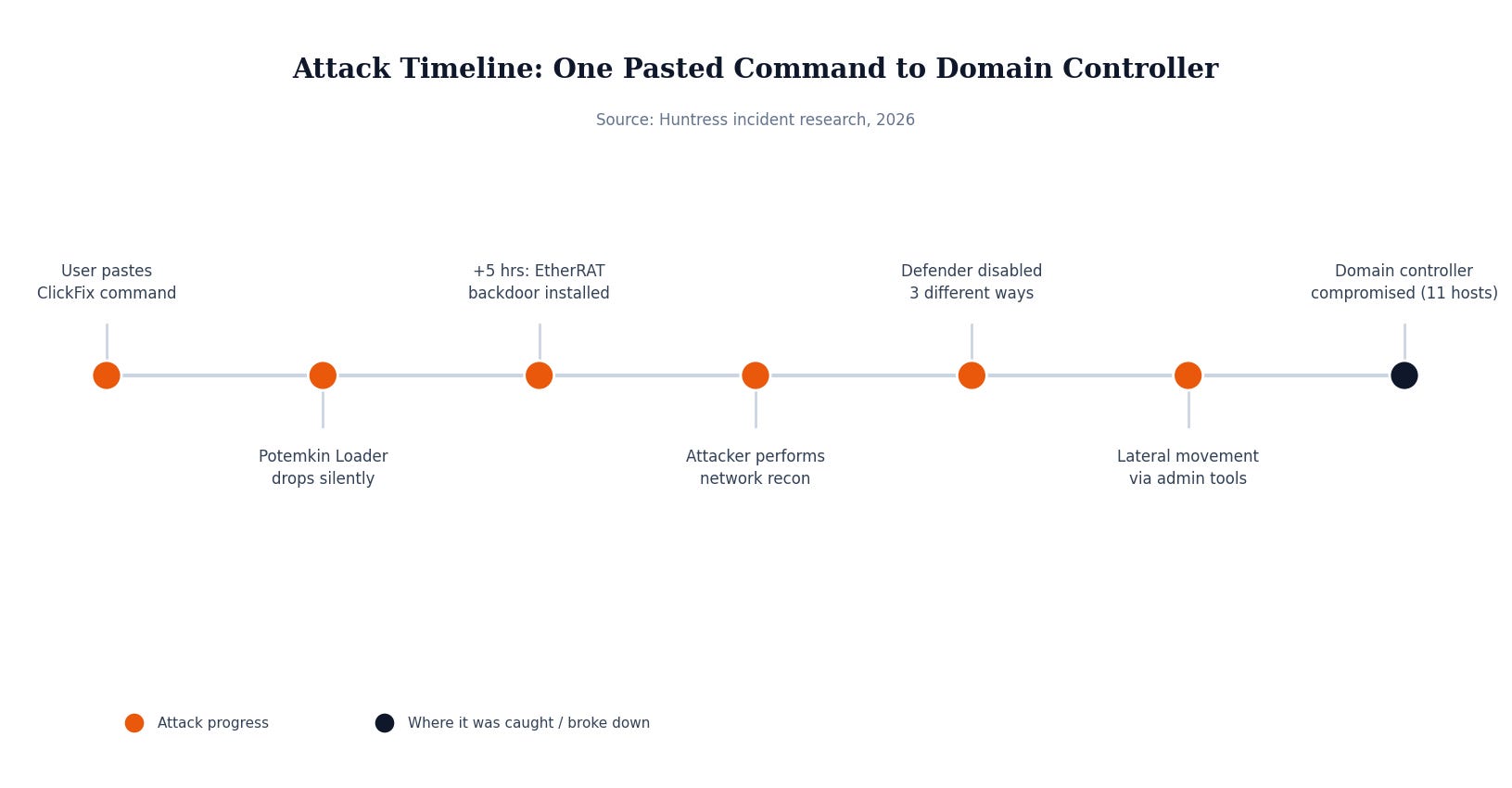
Here’s the timeline, in plain terms:
An employee landed on a compromised website that threw up a fake “verification” or “error” screen: the kind that tells you to press Windows key + R and paste a short command to prove you’re not a bot, or to fix a page that “isn’t loading correctly.” Security researchers at Huntress describe the psychology plainly: people naturally follow directions when presented with a clear, authoritative-looking instruction. There’s no attachment to scan, no link to hover over. The user does the work themselves, one paste and one Enter key at a time.
The pasted command quietly abused a legitimate Windows tool to fetch and run a malicious file, which downloaded a silent installer and dropped a piece of malware Huntress calls the Potemkin Loader onto the machine, set to relaunch every time the computer started.
Five hours later, a second piece of malware, a backdoor the researchers named EtherRAT, showed up on the same machine, adding its own persistence and quietly setting up shop.
From there it stopped being automated. A real person got on the keyboard. They mapped out the network, checked which accounts had admin rights, and started moving from machine to machine using legitimate IT administration tools already trusted on the network. They also brought a script whose entire job was disabling Windows Defender through three separate methods at once so that if one method got reversed, the other two still held the door open.
By the time anyone noticed, the attackers had reached the domain controller, the server that manages logins for the entire network, and had system-level access. Eleven computers were confirmed compromised. Huntress’s assessment of the timeline is blunt: the attacker likely had hours of unobserved access, all before any telemetry existed to detect it.
Why This Matters If You’re Not a Big Company
This isn’t a targeted attack in the sense most people picture; nobody researched this specific company for weeks. The initial site was compromised opportunistically, and whoever landed on it and pasted the command became the target. That means company size is irrelevant to whether this happens to you. It’s entirely relevant to how bad it gets afterward, because the difference between “one infected laptop, cleaned in an hour” and “domain controller compromised, week-long incident response” comes down to what was watching that laptop, not how big the company is.
The other detail worth sitting with: the malware in this case used a fallback communication method (reading its next server address from a public blockchain ledger) specifically so that taking down one domain wouldn’t cut off attacker access. These aren’t smash-and-grab amateurs. The tooling is professional. The entry point is just a person following instructions.
What Actually Would Have Stopped This
The entire chain starts with one specific Windows feature: the Run dialog, the box that opens with Windows key + R. That’s the only door this attack walks through. It can be disabled organization-wide through Group Policy with no meaningful loss of functionality for almost any employee, and doing so eliminates the ClickFix technique entirely, regardless of how convincing the fake page is.
Everything after that first click depends on a second factor: whether every device on the network actually has endpoint protection running, watching, and reporting. Huntress’s own note on this incident is direct: audit your fleet for gaps, because workstations, servers, and any machine with network access should have an agent on it. The attackers in this case got hours of free movement specifically because part of the network wasn’t being watched.
Security Checklist for Your Business
A few things from this incident are worth checking regardless of your industry:
Disable the Windows Run dialog via Group Policy for users who don’t need it. This one setting closes the door this entire attack walked through.
Confirm endpoint protection is on every device, not most devices. A single unmonitored machine is enough to give an attacker hours of free movement.
Watch for defense-tampering commands, not just malware itself: scripts that disable Windows Defender, stop security services, or add broad antivirus exclusions are a stronger signal than most people treat them as.
Train on the new pattern, not just the old one. “Don’t click links or open attachments” no longer covers this. Add: never paste anything into the Run dialog or a terminal because a website told you to.
None of this requires exotic tooling. It requires knowing whether your Run dialog is locked down and whether every endpoint actually has coverage, two things worth confirming this week rather than after an incident report. MSP Today’s trusted tech partner is JK Computer Solutions. If you want a second set of eyes on your setup, get in touch.