

Last month, security researchers at Huntress published a play-by-play of a ransomware attack that’s worth every business owner’s attention, not because it’s unusual, but because it’s completely ordinary. This is how most of these attacks actually happen.
How the Attack Unfolded
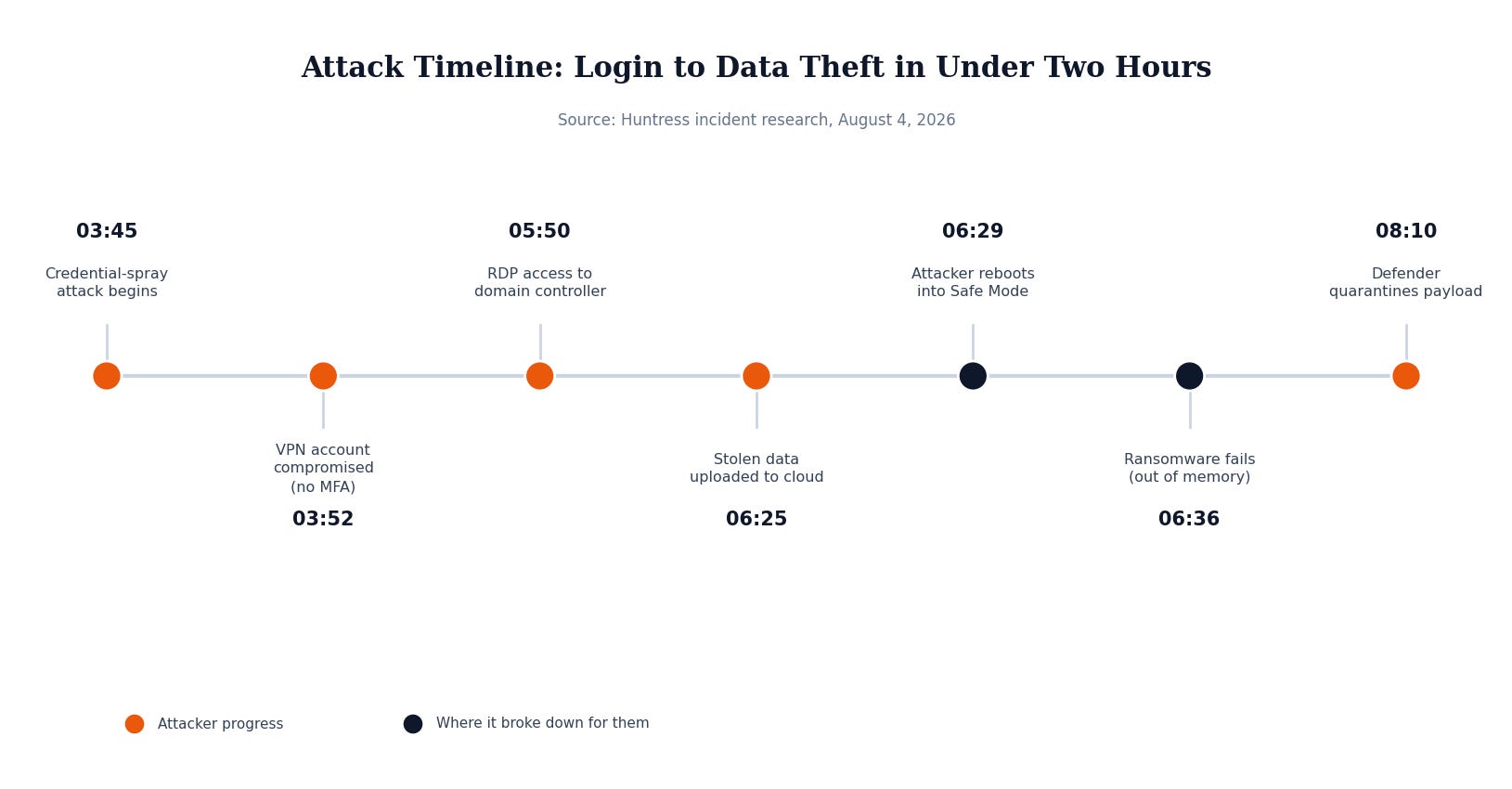
Here’s the timeline, in plain terms:
At 3:45 AM, attackers started guessing passwords against a company’s VPN, the remote access tool employees use to log in from outside the office. That VPN didn’t require a second form of login verification (MFA), just a username and password. Seven minutes later, they guessed correctly and were in.
By 5:50 AM, they had remote desktop access to the company’s domain controller, the server that controls logins and permissions for the entire network. From there they mapped out every user and computer on the network, moved to other servers, and started zipping up files from shared drives.
By 6:25 AM, they’d uploaded the stolen files to their own cloud storage. Total time from first login attempt to data theft: under two hours.
Then they went for the ransomware payload, and this is the part that should give you pause rather than comfort. To disable the company’s antivirus and endpoint protection, the attackers rebooted the server into Windows Safe Mode, a stripped-down startup mode that skips most security software. It worked. Both the company’s EDR agent and Windows Defender’s real-time protection went dark.
But Safe Mode also runs with very limited system memory, and the ransomware program itself couldn’t get enough memory to run. It crashed. When the server rebooted normally a couple hours later, Windows Defender’s scheduled scan caught the leftover file and quarantined it.
The network wasn’t encrypted. But the data was already gone, and the attackers still had everything they needed to demand payment under threat of leaking it.
Why this matters even if you’re not a big company
It’s tempting to read stories like this and assume they only happen to large enterprises with something worth stealing. That’s backwards. Attackers in cases like this aren’t picking a specific target and researching it for weeks. They’re scanning the internet for VPNs and remote access tools that are missing basic protections, and working through whichever ones answer. A ten-person company and a ten-thousand-person company look identical to that kind of scan if neither one has MFA turned on.
The other thing worth sitting with: this company didn’t get saved by a security team catching the intrusion. They got saved by the ransomware itself running out of memory in a stripped-down operating mode. That’s not a plan. That’s luck, and it only covered one part of the damage. The data theft succeeded regardless.
What Actually Would Have Stopped This
The entire chain of events traces back to one missing control: multi-factor authentication on the VPN. If that login had required a phone approval or a code in addition to a password, the credential-guessing attack that opened the door wouldn’t have worked at all. Everything that happened afterward, the domain controller access, the data theft, the attempted ransomware, never gets a chance to start.
Security Checklist for Your Business
A few other things from this incident are worth taking as checklist items, regardless of what industry you’re in:
MFA on every remote access point. Not just email. VPNs, remote desktop, admin portals, anything reachable from outside your building.
Alerting on repeated failed logins. A string of failed password attempts followed by a success is a specific, detectable pattern. Someone or something should be watching for it.
Endpoint protection on every device, not most devices. The researchers noted this organization had coverage gaps, meaning some systems weren’t protected at all.
Logging that actually gets reviewed. VPN logs and Windows event logs told the whole story after the fact. The value is in catching it during, which requires those logs to be centralized and monitored, not just collected.
None of this requires a big budget or a security team. It requires knowing what’s currently turned on and what isn’t. If you don’t know offhand whether your remote access requires MFA, that’s worth a call to whoever manages your IT this week, before it’s the subject of an incident report instead of a quick fix. MSP Today’s trusted tech partner is JK Computer Solutions. If you want a second set of eyes on your setup, get in touch.