

What the Data Shows
Netskope Threat Labs spends its time watching what actually flows across enterprise networks, not what IT policy says should flow across them. Its January 2025 Cloud and Threat Report, built from telemetry across its customer base over the course of 2024, put a number on something most IT teams already suspected but rarely have hard data on: 88% of all employees used a personal cloud app, meaning an app instance tied to their own account rather than a company-managed one, at least once a month. That’s not a niche behavior. That’s nearly the entire workforce.
The more important number sits inside that one. Of those employees, more than one in four, 26%, weren’t just logging into a personal Gmail or a personal Google Drive to check something. They were uploading, posting, or otherwise sending data into it. And when Netskope’s researchers broke down what kind of data was actually crossing that line, the largest category, 60% of all policy violations, was regulated data: personal information, financial records, healthcare data, the kind of information that carries breach-notification obligations the moment it leaves a company’s control. Behind that came intellectual property at 16%, source code at 13%, and passwords or access keys at 11%.
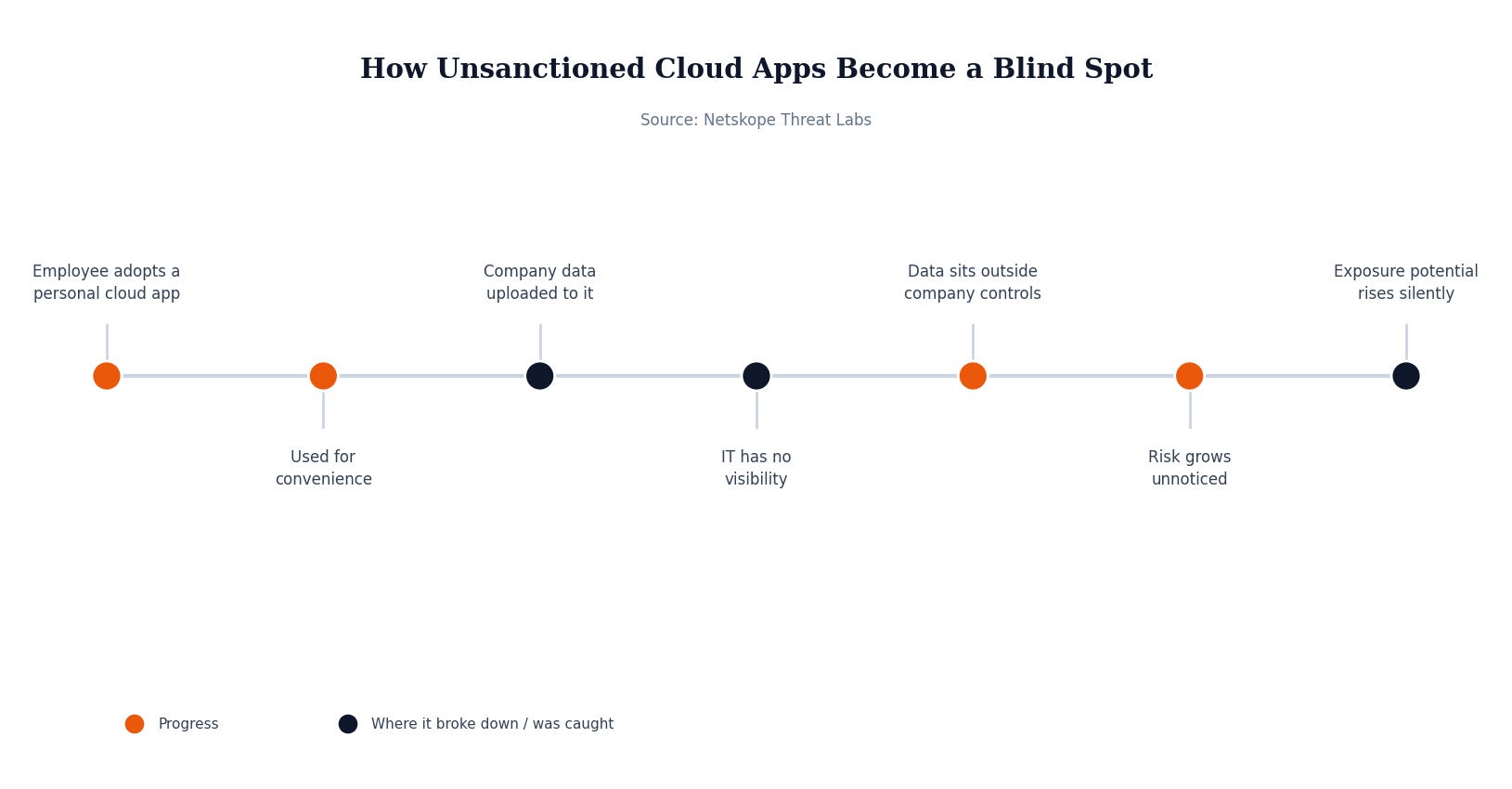
None of this requires a sophisticated attacker or a clever phishing lure. It’s an employee finishing a report from home on a personal laptop and emailing themselves the file. It’s someone backing up client records to their own Google Drive because it’s faster than requesting access to the company’s system. It’s a departing employee moving a folder of “their” work to a personal OneDrive on the way out. Each individual action looks harmless in the moment. At the scale Netskope measured it, across a full year of traffic, it adds up to a steady, largely invisible drain of regulated and proprietary data into accounts no IT department controls, secures, or can revoke.
That’s the core problem shadow IT creates: not that employees are being reckless, but that they’re solving real work problems using whatever’s fastest, and the fastest option is almost never the one IT signed off on. The data doesn’t go anywhere dramatic. It just goes somewhere IT can’t see, can’t audit, and can’t pull back if that personal account is later compromised, sold in an account-recycling marketplace, or simply left logged in on a shared family computer.
Why This Matters If You’re Not a Big Company
It’s tempting to read a stat like “88% of employees” and assume it’s describing a 50,000-person enterprise with sprawling departments nobody can fully monitor. It isn’t. The behavior underneath that number, an employee moving a file to a personal account because it’s convenient, doesn’t scale with company size. A 12-person accounting firm has the exact same dynamic as a Fortune 500 company: people finishing work at home, syncing folders to whatever cloud app they already have open, and reaching for their own login when the company system is slow or the access request would take too long.
Small and mid-size businesses are actually in a worse position on this specific risk, not a better one. Larger organizations at least have a chance of running a cloud access security tool that flags this kind of data movement. Most small businesses have no visibility into it at all, which means the first sign of a problem is usually a client asking why their financial records showed up somewhere they shouldn’t have, or a departing employee’s personal Drive account turning out to still have last quarter’s client files sitting in it, discovered only when something goes wrong.
What Actually Would Have Stopped This
The fix here isn’t a lecture about policy. It’s closing the gap between “the sanctioned way to do this” and “the fastest way to do this,” because employees will always default to whichever one wins. That means IT-approved cloud storage and file-sharing tools need to actually be as convenient as the personal alternative, accessible from home, easy to request access to, and not gated behind a multi-day approval process that pushes people toward Google Drive out of sheer impatience.
The second piece is visibility. A business doesn’t need enterprise-grade cloud security software to catch most of this; it needs basic controls, like blocking uploads to unmanaged personal cloud accounts at the network or endpoint level, and a clear, low-friction path for employees to request an exception when they genuinely need one. Pair that with an offboarding checklist that actually asks “what personal apps did this person have company files in” rather than just disabling their company email, and the two biggest exposure windows, ongoing quiet leakage and departure-day data walking out the door, both shrink substantially.
Security Checklist for Your Business
Make the approved tool the fast tool. If requesting access to company file storage takes days, employees will default to personal apps out of pure convenience — fix the friction, not just the policy.
Block uploads to unmanaged personal cloud accounts. Basic DLP or endpoint controls can stop company data from flowing into personal Google Drive, OneDrive, or webmail accounts without slowing down legitimate work.
Build shadow IT checks into offboarding. Ask departing employees directly what personal apps might still hold company files, not just what company accounts to disable.
Audit what’s actually being used, not what’s approved. Periodically review network and cloud traffic for personal app usage — the gap between policy and reality is exactly where this risk lives.
The uncomfortable part of this data isn’t that employees are trying to cause harm. It’s that convenience quietly wins over policy almost every time, and most small businesses have no way to even see it happening. MSP Today’s trusted tech partner is JK Computer Solutions. If you want a second set of eyes on your setup, get in touch.
Source: Netskope, “Netskope Threat Labs: Phishing Clicks Nearly Tripled in 2024, Ubiquitous Use of Personal Cloud Apps and GenAI Tools Require Modern Workplace Security to Mitigate Risk”.